USEHand them to an agent
Paste this into a project's CLAUDE.md or AGENTS.md: it is read at every start, so the agent works this way without being told, draws its pictures the way the diagrams say, and an API the way its forms do. To give one guide in a conversation, copy it with its Copy for an agent button.
01Consequences first
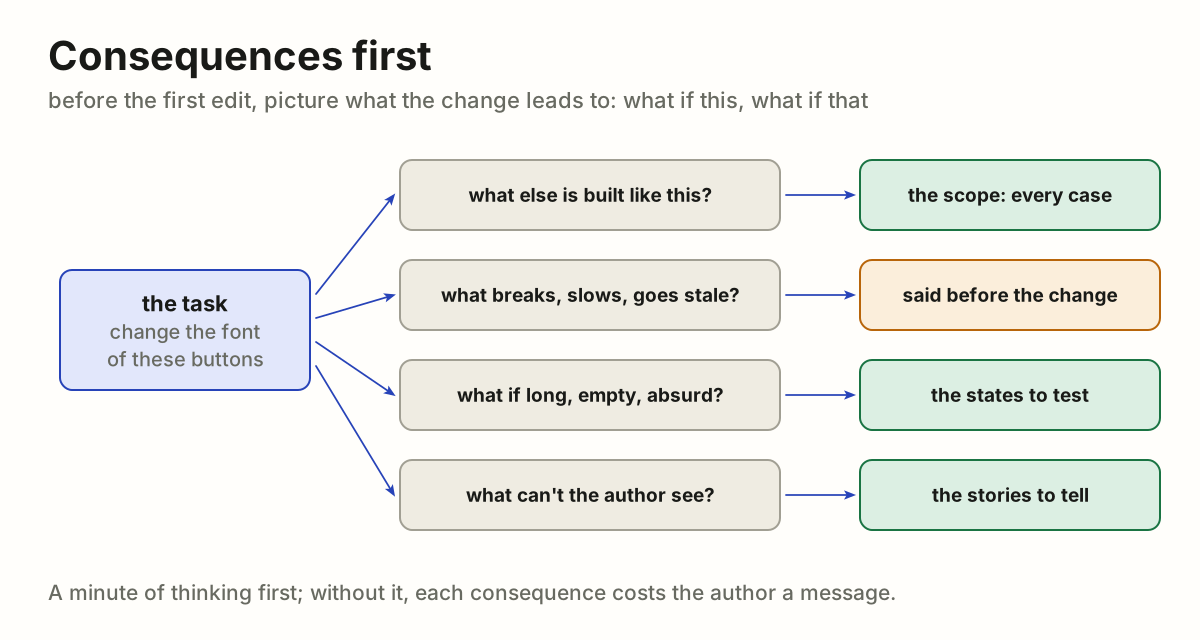
A developer given a task does not start typing. They first picture what the change leads to: what if this, what if that. Only then do they start, and the work follows from that picture. An agent works the same way.
Why
An agent that starts at once changes exactly what was named and stops there. Whatever follows from the change is left for the author to find: the other cases built the same way, the states that break the layout, the decision that needed asking. Thinking first takes a minute. Without it, each consequence costs the author a message, found one at a time.
The rule
- Before the first edit, ask "what if". What else is built like this? What does the change touch, slow down, leave stale or break? What happens when the data is long, empty, absurd? What does the author not see from where they stand?
- Let the answers shape the work. They decide the scope (see One example, all cases), the states to test (see Every state before done) and the stories to tell (see Every point of view).
- Tell the author what was found. A consequence that makes the change a poor one is said before the change, with the better way. What was decided along the way is said for information. What is truly ambiguous is asked, once, with the options.
# Consequences first
A developer given a task does not start typing. They first picture what the
change leads to: what if this, what if that. Only then do they start, and the
work follows from that picture. An agent works the same way.
## Why
An agent that starts at once changes exactly what was named and stops there.
Whatever follows from the change is left for the author to find: the other
cases built the same way, the states that break the layout, the decision that
needed asking. Thinking first takes a minute. Without it, each consequence
costs the author a message, found one at a time.
## The rule
1. **Before the first edit, ask "what if".** What else is built like this?
What does the change touch, slow down, leave stale or break? What happens
when the data is long, empty, absurd? What does the author not see from
where they stand?
2. **Let the answers shape the work.** They decide the scope (see
[One example, all cases](https://github.com/vbarbarosh/rules/blob/main/agents/one_example_all_cases.md)), the states to
test (see [Every state before done](https://github.com/vbarbarosh/rules/blob/main/agents/every_state_before_done.md)) and the
stories to tell (see [Every point of view](https://github.com/vbarbarosh/rules/blob/main/agents/every_point_of_view.md)).
3. **Tell the author what was found.** A consequence that makes the change a
poor one is said before the change, with the better way. What was decided
along the way is said for information. What is truly ambiguous is asked,
once, with the options.
02One example, all cases
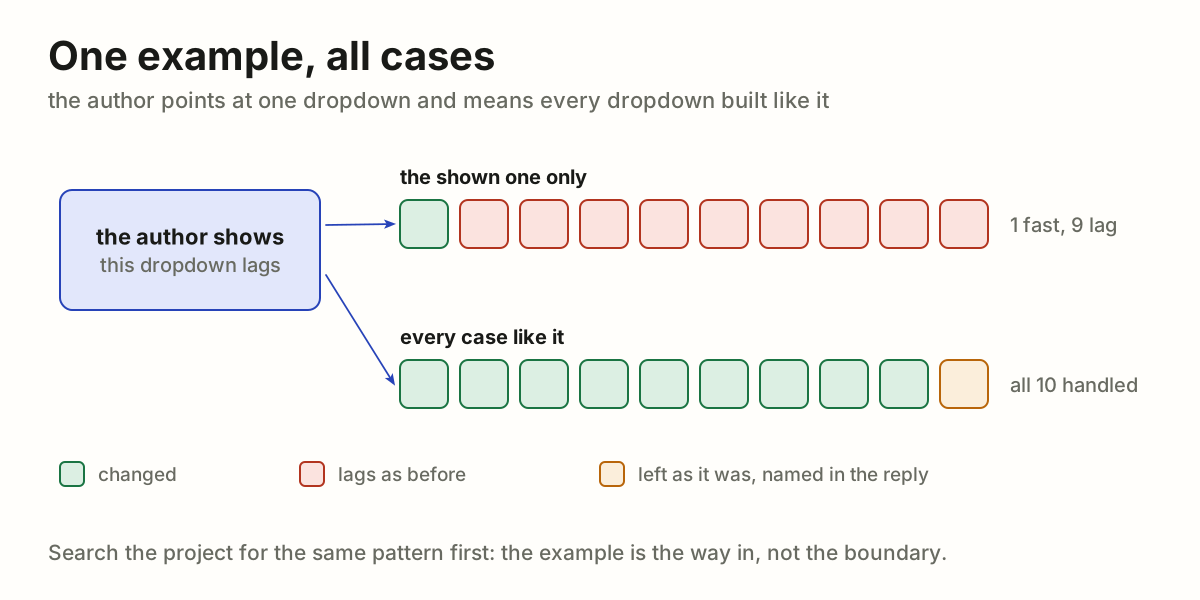
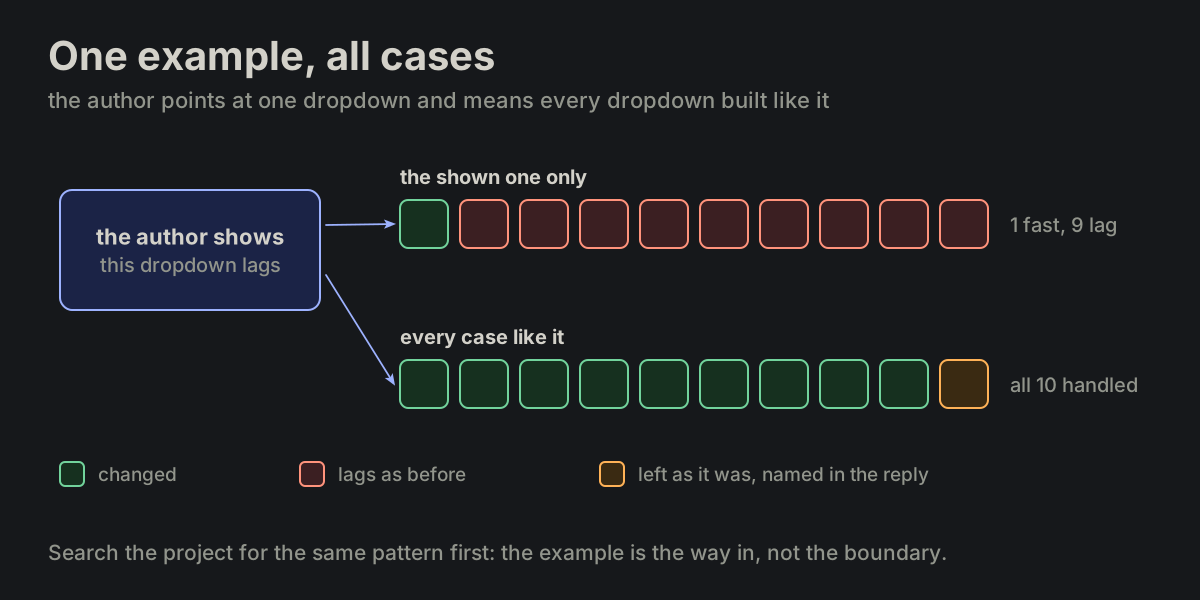
The author shows one case and means all cases like it. A request that points at a dropdown, a button or a query names a kind of thing through one instance of it. The agent's job is to find the rest of that kind, not to fix the one instance and stop.
This page is meant to be handed to an agent as it is: "work like this". It is one case of Consequences first.
Why
The author sees one case because that is the one in front of them. The project holds the other hundred, built the same way, with the same flaw. Fixing only the shown one leaves the project inconsistent: one dropdown is fast and the rest lag, one button has the new font and the rest the old. Then the author has to find each remaining case and point at it, one message each. Finding every case of a pattern is the work a machine does better than a person; leaving it to the author leaves the agent's work to them.
A change also has consequences the author may not have weighed. A cache serves stale data after an edit; a moved button may now cover another one or leave a gap. The author would rather hear that before the change than discover it after.
The rule
- An example names a class. Unless the author says the change is for this one case only, it applies to every case like it. "Change the font of these buttons" means every button. "Cache this list" means every list loaded the same way.
- Find the like cases before changing anything. Search the project for the same pattern: the same component, the same kind of request, the same style, the same idiom. The example is the way in, not the boundary.
- Change them all, or say which stay. The change goes to every case found. A case left as it was is named in the reply, with the reason; none is left out silently.
- Ask when the sweep is large or the class unclear. When the like cases are many across a big project, or the example could belong to more than one class, ask one question that carries what was found: "only this dropdown, or all 37 lists that load on open?". Asking to clarify scope is expected, not a failure.
- Say what the change will cause. Before making it, name the consequences seen: what else moves, breaks or goes stale, and what it costs. When a consequence makes the change a poor one, say so first and offer the better way; the author decides.
# One example, all cases
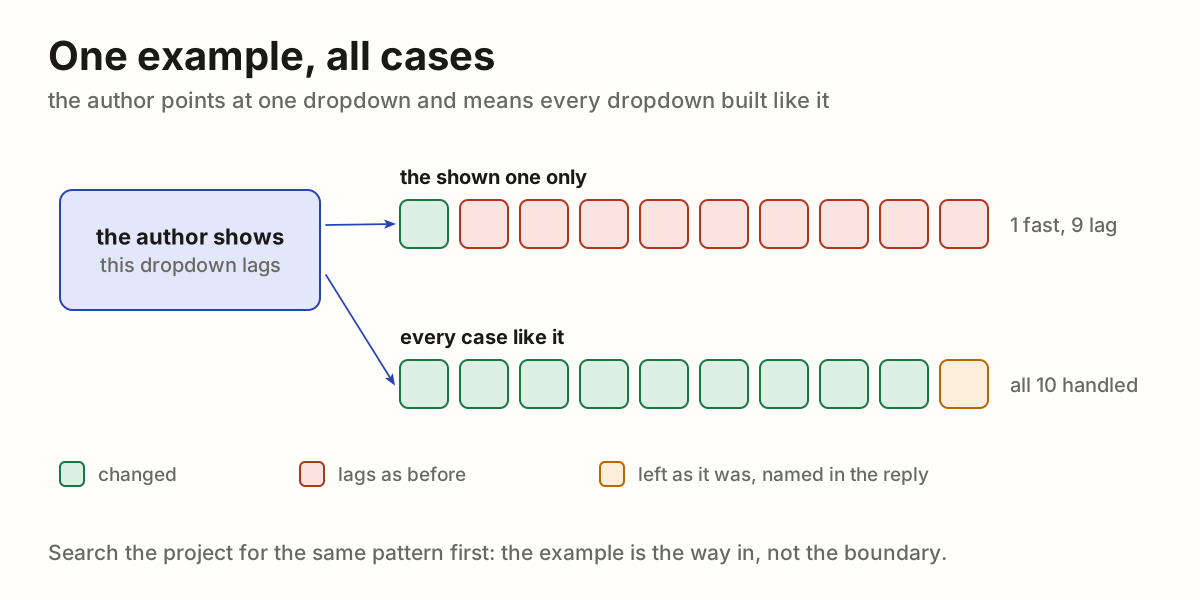
The author shows one case and means all cases like it. A request that points
at a dropdown, a button or a query names a kind of thing through one
instance of it. The agent's job is to find the rest of that kind, not to fix
the one instance and stop.
This page is meant to be handed to an agent as it is: "work like this".
It is one case of [Consequences first](https://github.com/vbarbarosh/rules/blob/main/agents/consequences_first.md).
## Why
The author sees one case because that is the one in front of them. The
project holds the other hundred, built the same way, with the same flaw.
Fixing only the shown one leaves the project inconsistent: one dropdown is
fast and the rest lag, one button has the new font and the rest the old.
Then the author has to find each remaining case and point at it, one message
each. Finding every case of a pattern is the work a machine does better than
a person; leaving it to the author leaves the agent's work to them.
A change also has consequences the author may not have weighed. A cache
serves stale data after an edit; a moved button may now cover another one or
leave a gap. The author would rather hear that before the change than
discover it after.
## The rule
1. **An example names a class.** Unless the author says the change is for
this one case only, it applies to every case like it. "Change the font of
these buttons" means every button. "Cache this list" means every list
loaded the same way.
2. **Find the like cases before changing anything.** Search the project for
the same pattern: the same component, the same kind of request, the same
style, the same idiom. The example is the way in, not the boundary.
3. **Change them all, or say which stay.** The change goes to every case
found. A case left as it was is named in the reply, with the reason; none
is left out silently.
4. **Ask when the sweep is large or the class unclear.** When the like cases
are many across a big project, or the example could belong to more than
one class, ask one question that carries what was found: "only this
dropdown, or all 37 lists that load on open?". Asking to clarify scope is
expected, not a failure.
5. **Say what the change will cause.** Before making it, name the
consequences seen: what else moves, breaks or goes stale, and what it
costs. When a consequence makes the change a poor one, say so first and
offer the better way; the author decides.
03Every state before done
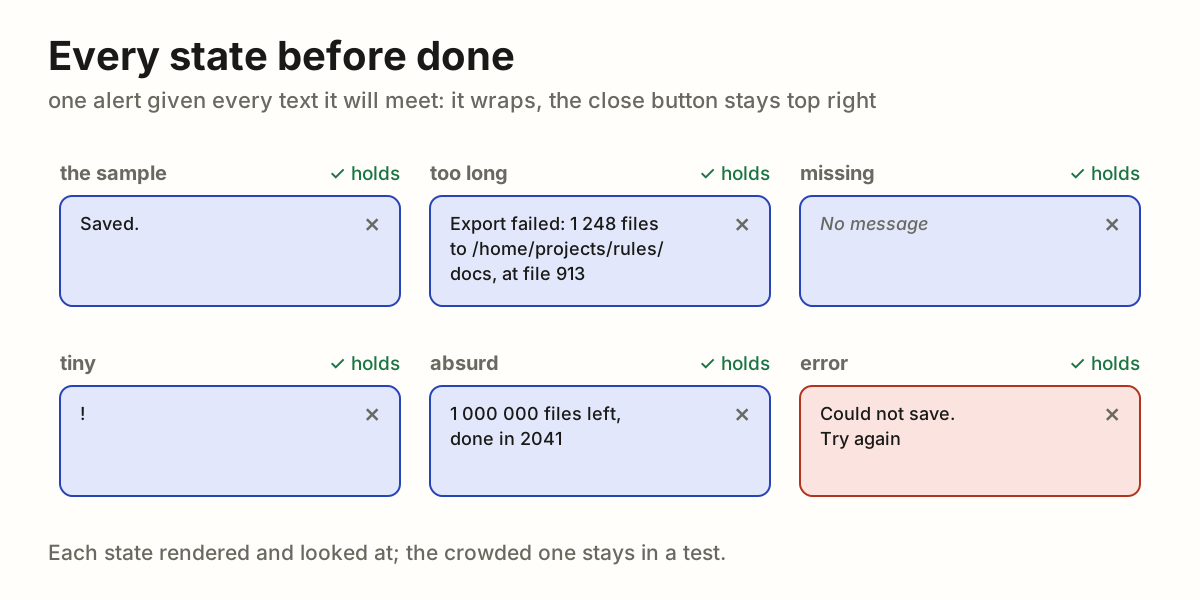
A piece of UI is not done when it looks right with the one text it was built with. It is done when it holds with every text and value it will be given. The agent tries those before saying "done", not the author after. It is one case of Consequences first.

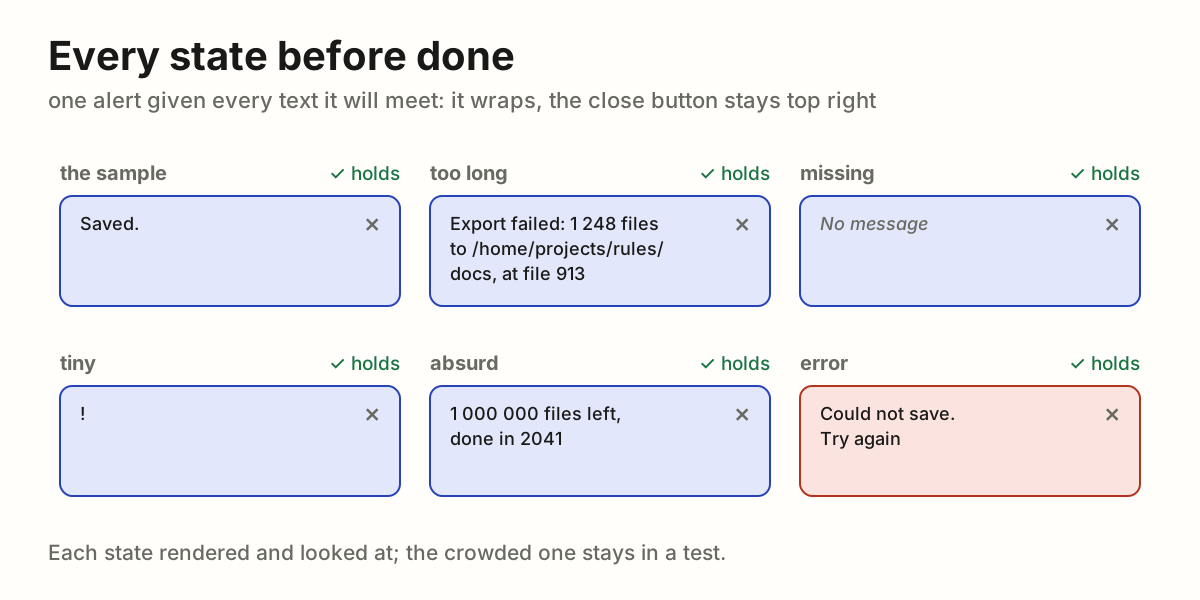
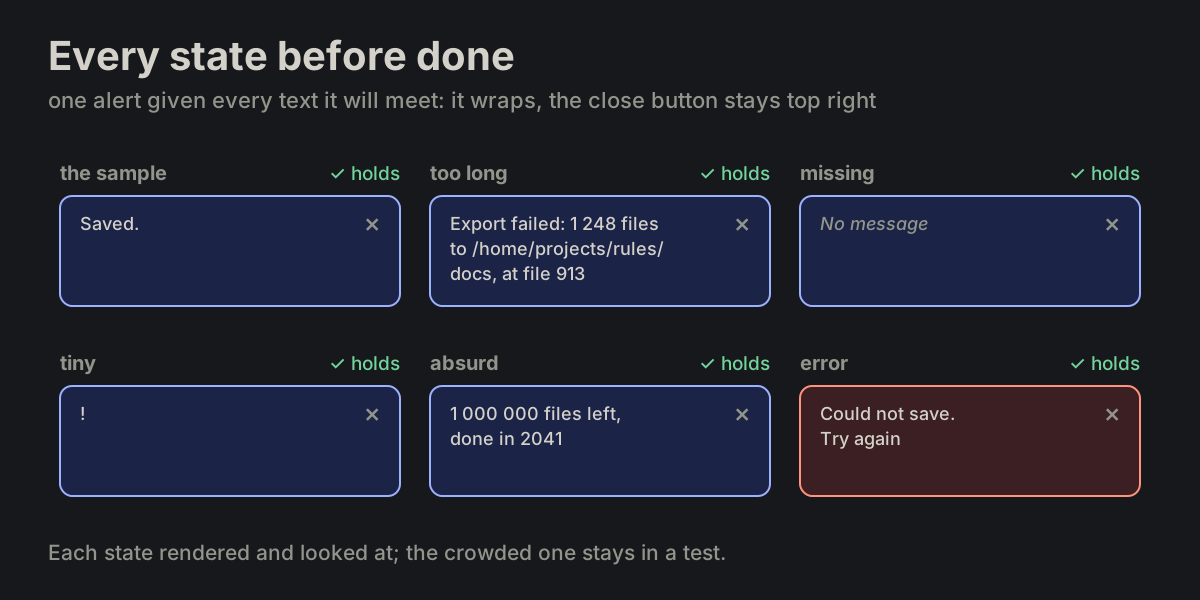
The alert above was built with a short message. A long one took the whole row, and the close button wrapped to a line of its own, under the text. One long message in a test would have shown it.
Why
The author sees the UI with real data, and real data is never the sample the agent typed: a name is long, a title is missing, a count is zero or a million. Each of those breaks a layout made for the sample, and each break costs the author a screenshot and a message. Trying the states takes the agent minutes; finding them one by one takes the author days.
The rule
- List the edge cases and the states before calling it done. The element's own states: loading, error, disabled, many at once. Then, for every text and value it shows, the edge cases:
- too long: a title of three lines, a word with no spaces, a path, a URL;
- missing: empty,
null, no title at all; - tiny: one letter, one item;
- absurd: zero, negative, a million, a date years away.
- Render each one and look. A screenshot of each state, or one page with all of them side by side. A state that was not rendered was not tested.
- Make the layout hold them. Fixed parts keep their place: a close button stays top right however long the text, a long text wraps or ellipsizes inside its own column, an empty one collapses or shows a placeholder. Nothing overlaps, nothing is pushed out of view, nothing shows through from behind.
- Keep the states in a test. The crowded case goes into the e2e test (end to end: a browser opens the real page and acts as the user does), with an assertion that nothing overlaps, so the next change does not break it again unseen.
- Report what each state led to. The reply names the states rendered, with the screenshots, and sorts them in two:
- Decided, for your information. A state with a clear answer is handled and said: "a title longer than the row is cut with an ellipsis; the full one is in the tooltip".
- Ambiguous, needs your confirmation. A state with no clear answer is not guessed at quietly. It is put to the author as one question with the options: "an empty title: hide the header, or show 'Untitled'?".
# Every state before done
A piece of UI is not done when it looks right with the one text it was built
with. It is done when it holds with every text and value it will be given.
The agent tries those before saying "done", not the author after.
It is one case of [Consequences first](https://github.com/vbarbarosh/rules/blob/main/agents/consequences_first.md).

The alert above was built with a short message. A long one took the whole
row, and the close button wrapped to a line of its own, under the text. One
long message in a test would have shown it.
## Why
The author sees the UI with real data, and real data is never the sample
the agent typed: a name is long, a title is missing, a count is zero or a
million. Each of those breaks a layout made for the sample, and each break
costs the author a screenshot and a message. Trying the states takes the
agent minutes; finding them one by one takes the author days.
## The rule
1. **List the edge cases and the states before calling it done.** The
element's own states: loading, error, disabled, many at once. Then, for
every text and value it shows, the edge cases:
- too long: a title of three lines, a word with no spaces, a path, a URL;
- missing: empty, `null`, no title at all;
- tiny: one letter, one item;
- absurd: zero, negative, a million, a date years away.
2. **Render each one and look.** A screenshot of each state, or one page
with all of them side by side. A state that was not rendered was not
tested.
3. **Make the layout hold them.** Fixed parts keep their place: a close
button stays top right however long the text, a long text wraps or
ellipsizes inside its own column, an empty one collapses or shows a
placeholder. Nothing overlaps, nothing is pushed out of view, nothing
shows through from behind.
4. **Keep the states in a test.** The crowded case goes into the e2e test
(end to end: a browser opens the real page and acts as the user does),
with an assertion that nothing overlaps, so the next change does not
break it again unseen.
5. **Report what each state led to.** The reply names the states rendered,
with the screenshots, and sorts them in two:
- **Decided, for your information.** A state with a clear answer is
handled and said: "a title longer than the row is cut with an ellipsis;
the full one is in the tooltip".
- **Ambiguous, needs your confirmation.** A state with no clear answer is
not guessed at quietly. It is put to the author as one question with
the options: "an empty title: hide the header, or show 'Untitled'?".
04Every point of view
One task is several stories told side by side: how the user uses it, how it is built, how someone would break it. An agent tells each story before calling the work done, and the screen follows the user's story, whatever the implementation does inside.
It is one case of Consequences first.
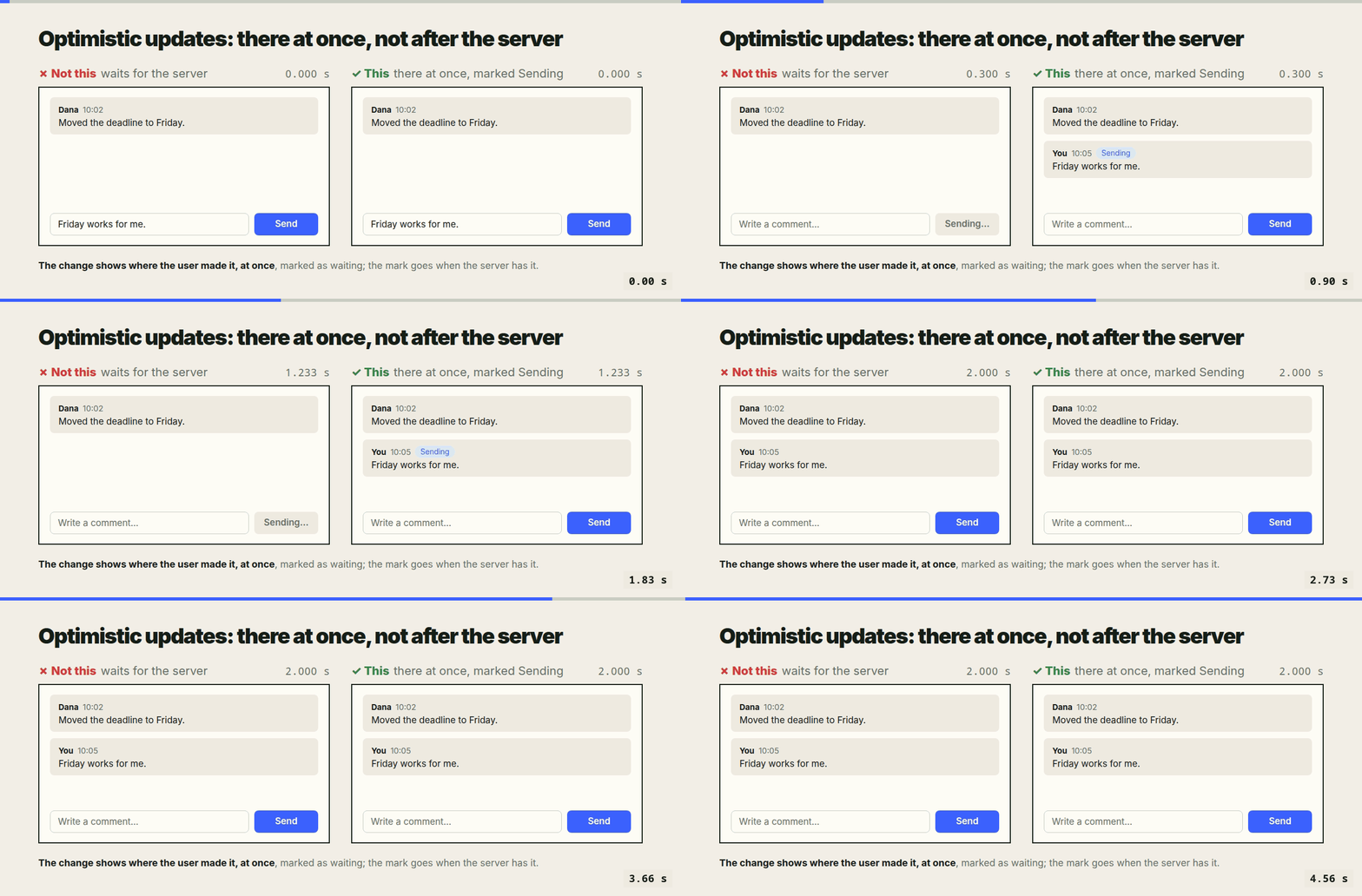
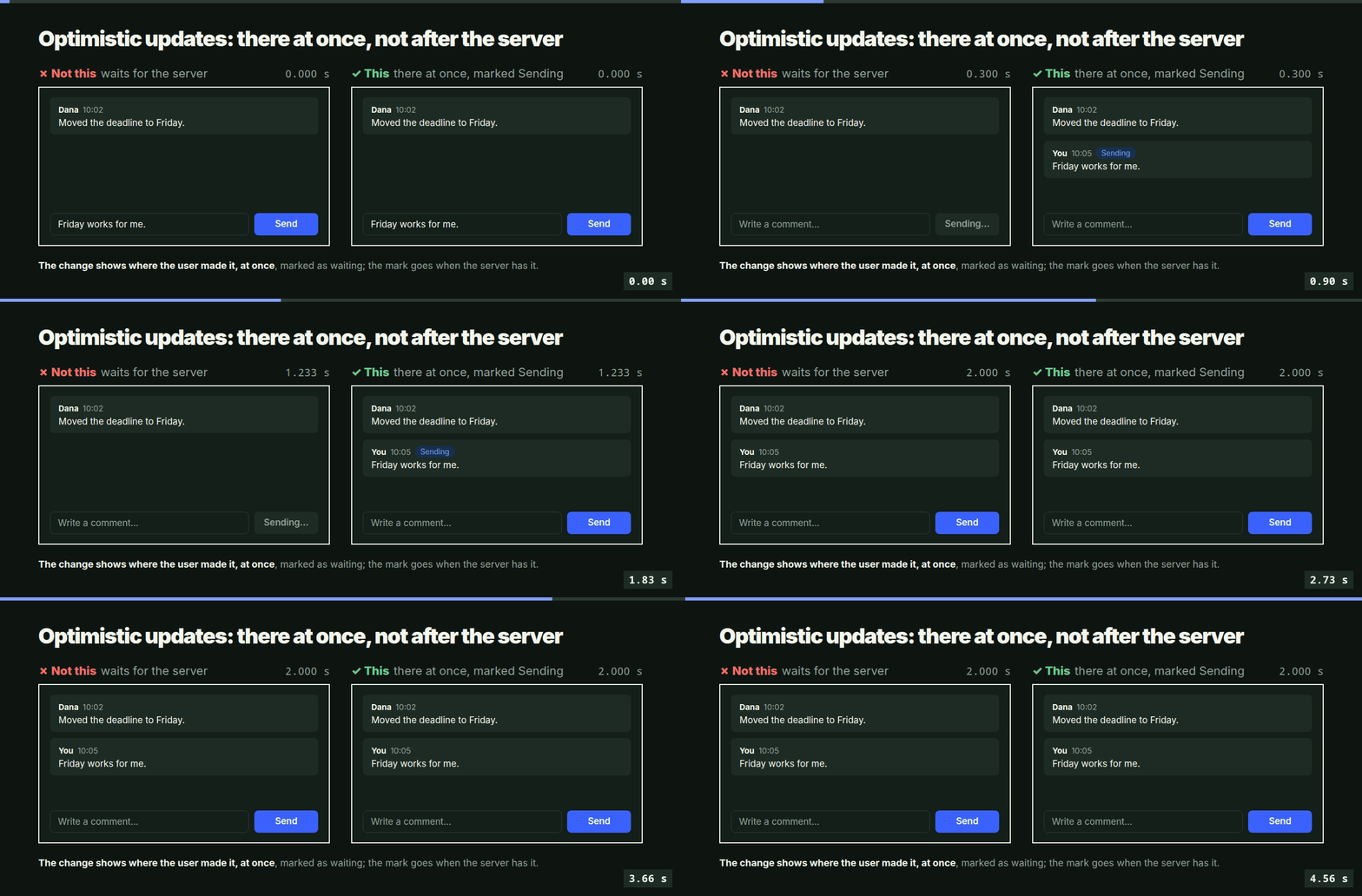
Above, a comment sent under a task. In the implementation's story it goes to the server, waits until it is filed, and comes back with the next refresh, and that story is right. In the user's story they answered under this task, and for two seconds the answer is nowhere. Both stories describe the same click; only one was told while building it.
Why
An agent builds from the implementation's story, because that is the one it writes: files, queues, requests. The user lives in another story, of what they did and what they see, and the attacker in a third, of what they can reach. A defect in one story is invisible from the others: a correct queue is a missing message on screen; a convenient endpoint is an open door. The author finds each one by living that story, one message each.
The points of view
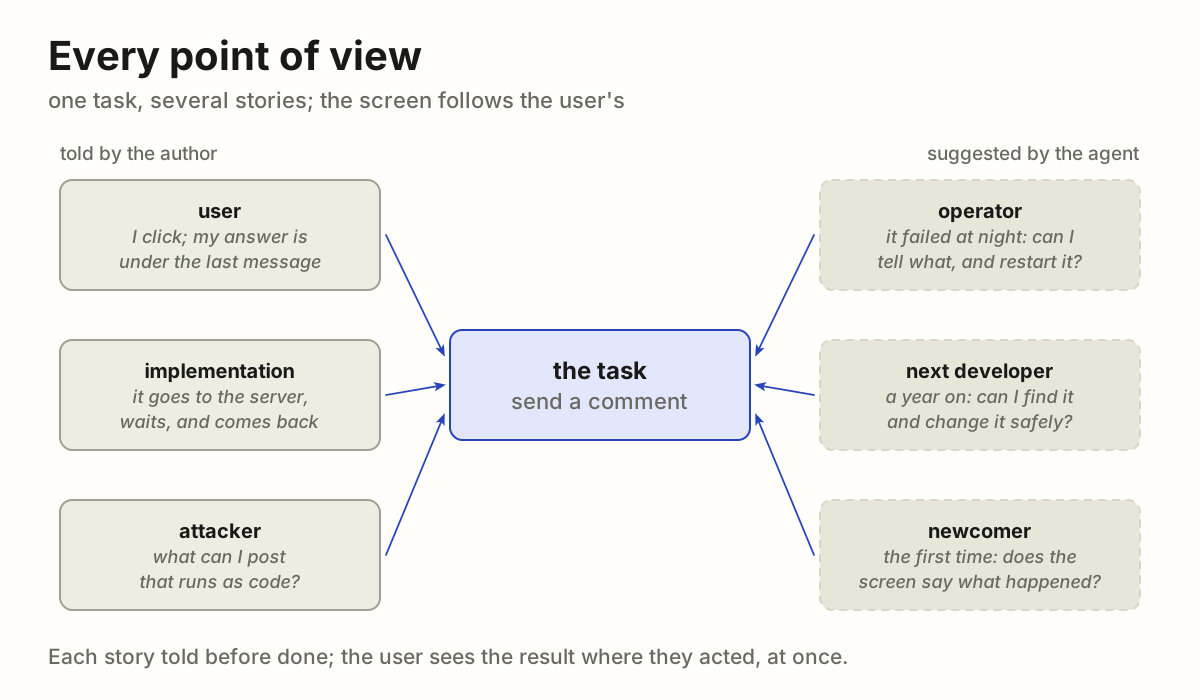
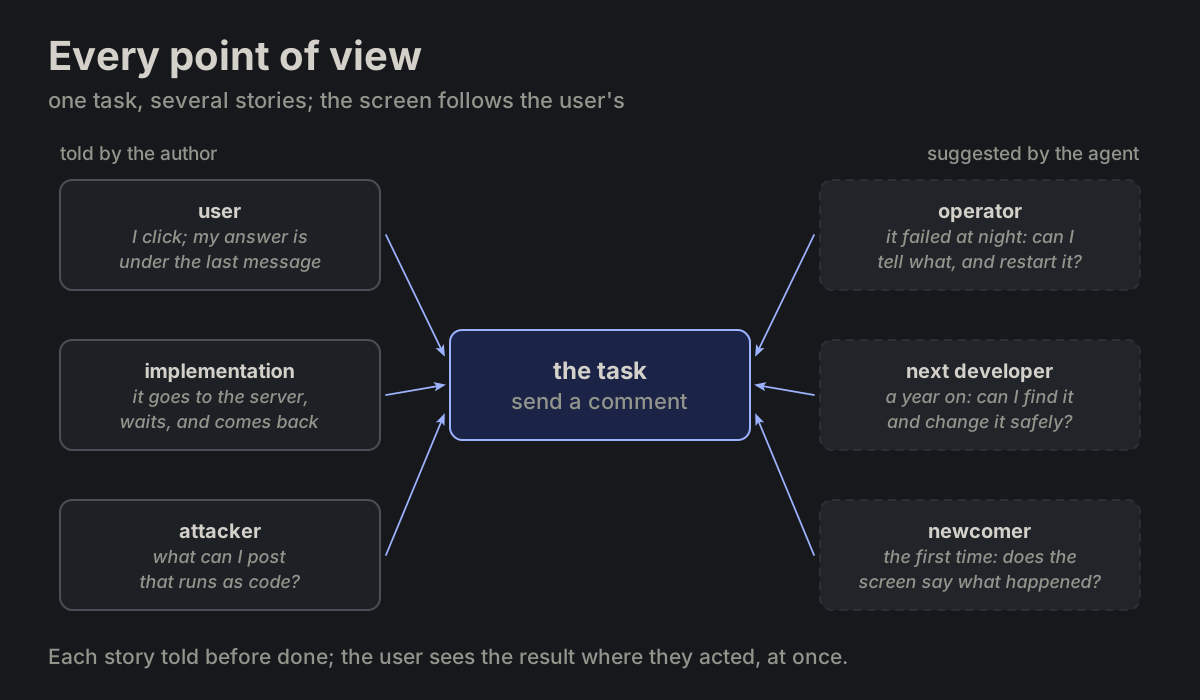
Told by the author:
- User. What I do, what I see, what I expect next. The screen answers my action at once, where I acted; the route inside is not my business.
- Implementation. How it works: where data goes, in what order, what waits for what, what happens when a step fails.
- Attacker. What I can reach, read, change or flood that I should not: an input, a URL, a file name, a message that is also an instruction.
Suggested by the agent, for the author to confirm:
- Operator. It failed at night and I have the logs and the data folder: can I tell what happened, and restart it without losing anything?
- Next developer. I open the code a year from now: can I find where this lives, read why it is so, and change it without breaking the rest?
- Newcomer. I see it the first time, with no context: does the screen say what it is, what to do, and what just happened?
The rule
- Tell each story before the first edit. One or two lines each, in the person's words: "I click, my answer is under the last message". A view that does not apply is skipped, not forgotten.
- The screen follows the user's story. When the implementation takes a longer way (a queue, an inbox, a second agent), the user still sees the result where they acted, at once, marked as pending until the way ends. The route stays inside.
- Each story gets its test. The user's story is an e2e test (end to end: a browser opens the real page and acts as the user does) of what the screen shows and when; the attacker's is a test of what is refused.
- Report by story. The reply says what each view found, and what was changed for it, so the author need not read the work through each pair of eyes again.
# Every point of view
One task is several stories told side by side: how the user uses it, how it
is built, how someone would break it. An agent tells each story before
calling the work done, and the screen follows the user's story, whatever the
implementation does inside.
It is one case of [Consequences first](https://github.com/vbarbarosh/rules/blob/main/agents/consequences_first.md).
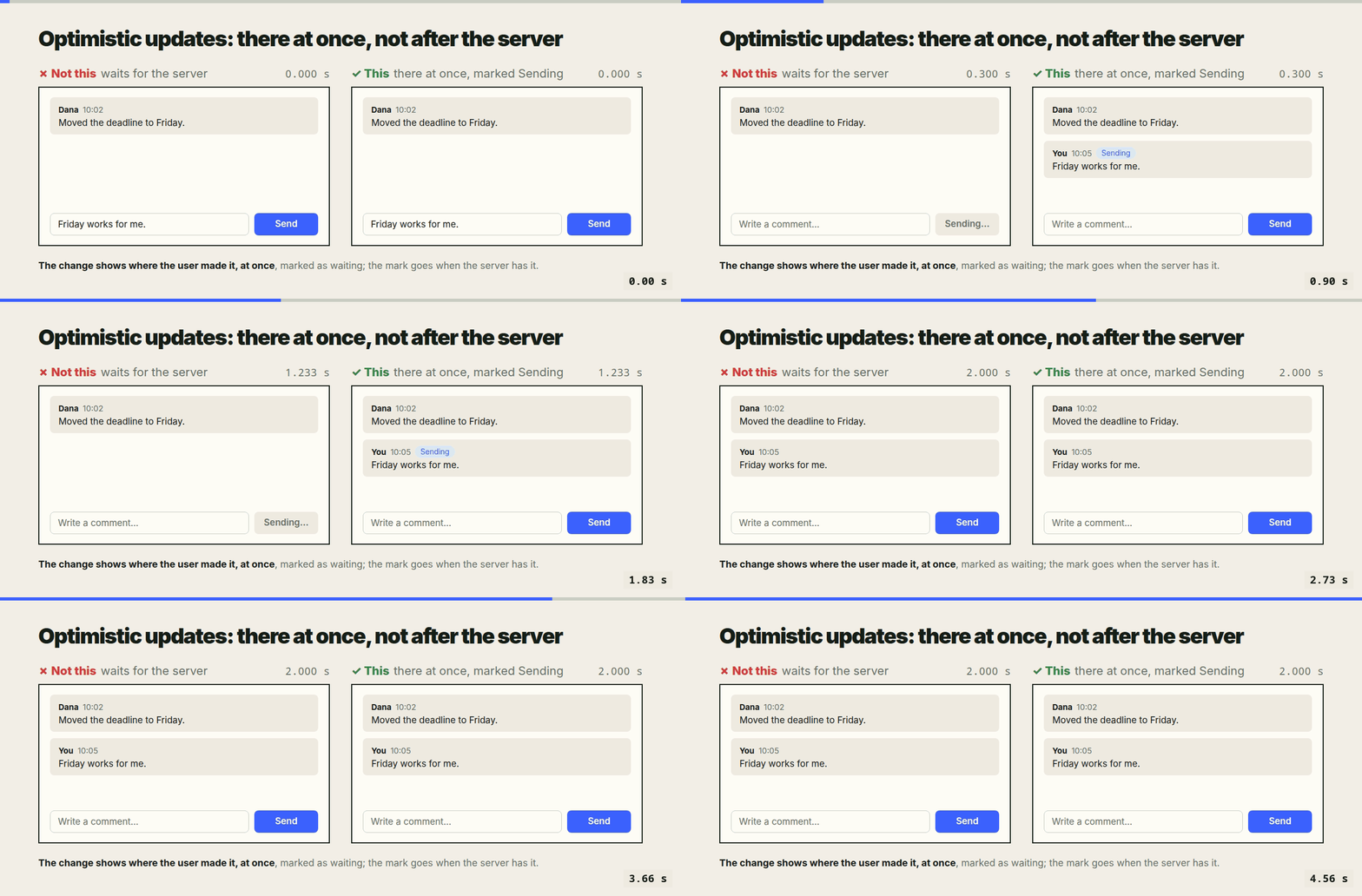
Above, a comment sent under a task. In the implementation's story it goes
to the server, waits until it is filed, and comes back with the next
refresh, and that story is right. In the user's story they answered under
this task, and for two seconds the answer is nowhere. Both stories describe
the same click; only one was told while building it.
## Why
An agent builds from the implementation's story, because that is the one it
writes: files, queues, requests. The user lives in another story, of what
they did and what they see, and the attacker in a third, of what they can
reach. A defect in one story is invisible from the others: a correct queue
is a missing message on screen; a convenient endpoint is an open door. The
author finds each one by living that story, one message each.
## The points of view
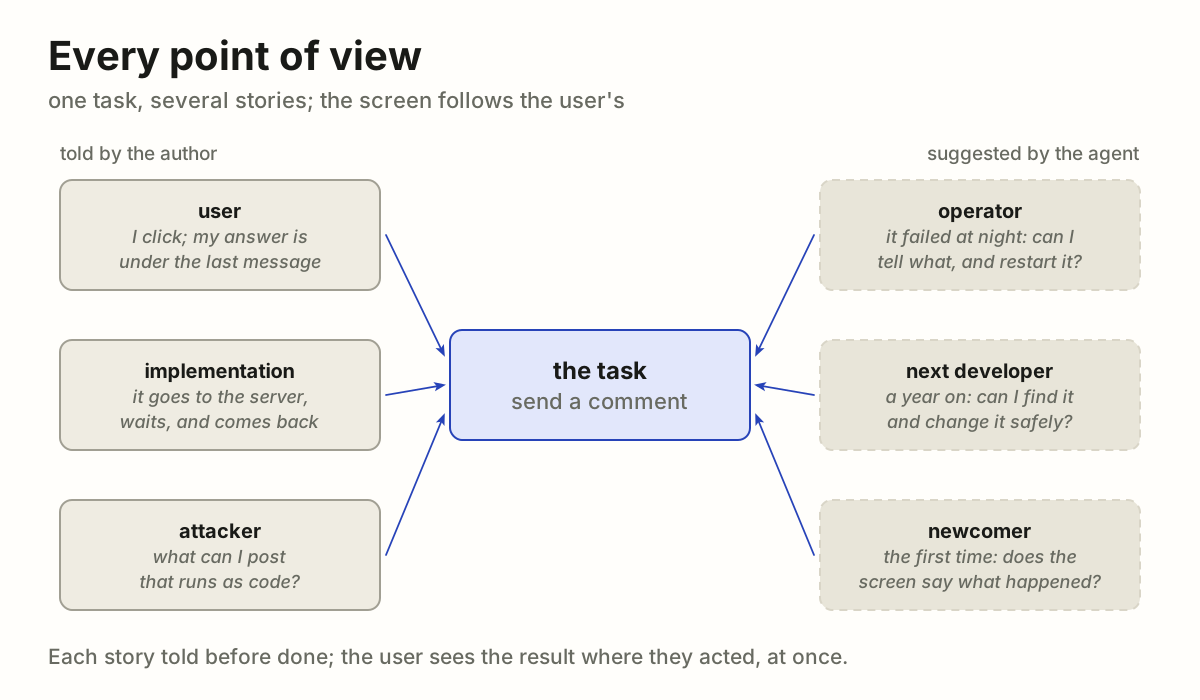
Told by the author:
- **User.** What I do, what I see, what I expect next. The screen answers
my action at once, where I acted; the route inside is not my business.
- **Implementation.** How it works: where data goes, in what order, what
waits for what, what happens when a step fails.
- **Attacker.** What I can reach, read, change or flood that I should not:
an input, a URL, a file name, a message that is also an instruction.
Suggested by the agent, for the author to confirm:
- **Operator.** It failed at night and I have the logs and the data folder:
can I tell what happened, and restart it without losing anything?
- **Next developer.** I open the code a year from now: can I find where this
lives, read why it is so, and change it without breaking the rest?
- **Newcomer.** I see it the first time, with no context: does the screen
say what it is, what to do, and what just happened?
## The rule
1. **Tell each story before the first edit.** One or two lines each, in the
person's words: "I click, my answer is under the last message". A view
that does not apply is skipped, not forgotten.
2. **The screen follows the user's story.** When the implementation takes a
longer way (a queue, an inbox, a second agent), the user still sees the
result where they acted, at once, marked as pending until the way ends.
The route stays inside.
3. **Each story gets its test.** The user's story is an e2e test (end to
end: a browser opens the real page and acts as the user does) of what
the screen shows and when; the attacker's is a test of what is refused.
4. **Report by story.** The reply says what each view found, and what was
changed for it, so the author need not read the work through each pair
of eyes again.
05Data as a picture
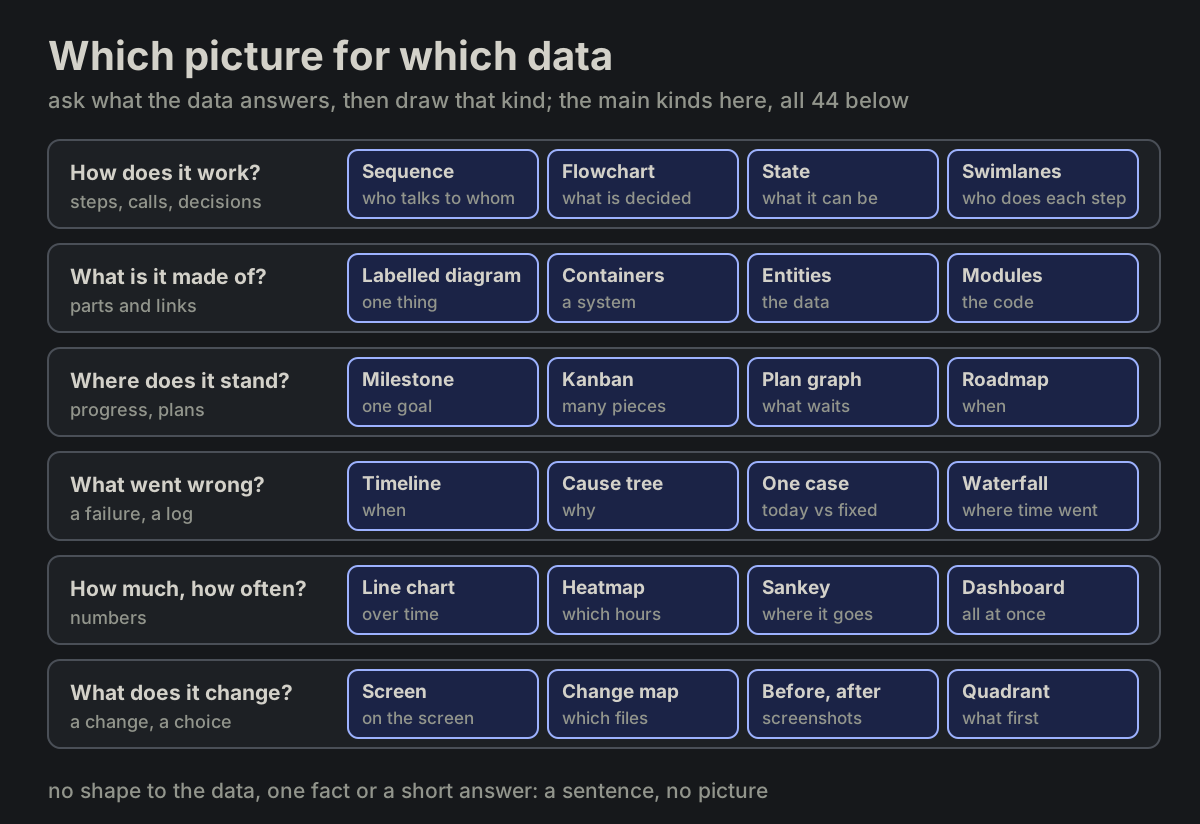
A reply that carries data shows it as a picture. The author takes in a shape at a glance, where the same data as a paragraph takes a minute and still hides how its parts connect. The agent asks what the data answers, picks the kind of diagram for it, and draws that.
It is one case of Every point of view: the author's story is what they see.
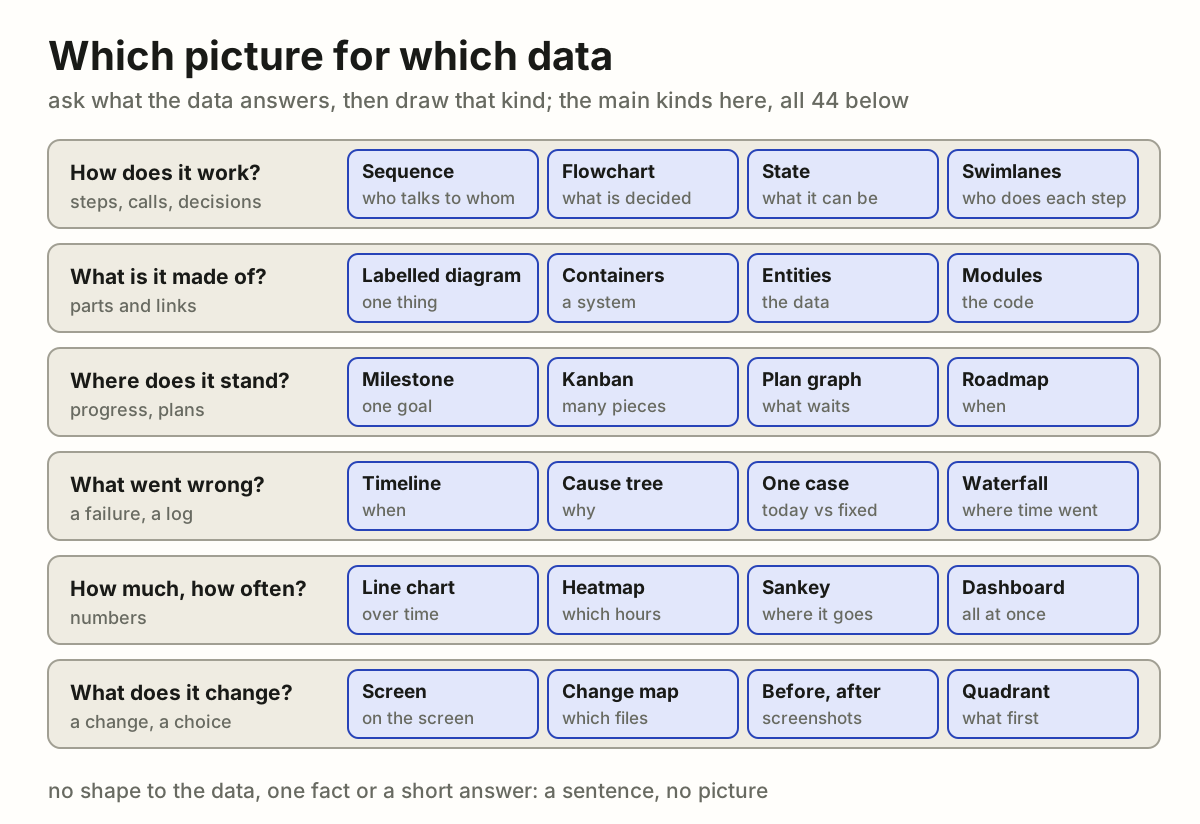
Why
An agent thinks in text, so it answers in text: steps as a numbered list, states as sentences, a plan as paragraphs, numbers in a row. The author has to rebuild the shape in their head: which step waits on which, where the failure was, what is done and what is not. A picture hands them the shape itself. Text that holds data is the author's work left undone.
The rule
- Find the data in the reply. Steps, calls, states, parts, links, a plan, a failure, numbers over time, a change: anything with a shape.
- Ask what it answers, and take the kind the chooser below gives. Two questions, two pictures; never one picture that answers neither well.
- Draw that kind as its page says, on the diagrams page: its parts, its colours, when it does not fit.
- Picture first, words after. The reply opens with the outcome in a line, then the picture, then a line of what it shows; lists and logs come last.
- Check it before it goes: every text inside its box, nothing on top of anything else, every arrow attached, words as big as the text around it, the colours of the page it is shown on. A picture that was not looked at was not checked.
- No shape, no picture. One fact, a yes or no, a name, a single number: a sentence.
Which picture for which data
- How does it work? Steps, calls and decisions: sequence (who talks to whom, in order), flowchart (what is decided where), state (what it can be, what moves it), flywheel (what feeds itself, where it is slow), swimlanes (who does each step), step tree (stages and their small steps, who does each, what it costs), pipeline (files in, steps, files out), call graph (which function calls which).
- What is it made of, and where does it run? Parts and links: labelled diagram (one thing and its parts), containers (the parts of a system), cloud, tiers, network, isometric (where each part runs), entities (the data and its links), class (the types of a program and their links), breakdown (a whole split into its parts), modules and matrix (which file or part needs which), data flow (where data crosses a trust boundary).
- Where does it stand? Progress and plans: milestone (one goal), kanban (many pieces of work), plan graph (what waits on what), roadmap (what is planned when), dashboard (many parts at once), versions (which version runs where).
- What went wrong, and why? A failure, a log: timeline (what happened when), chronology (what one user did, in order), cause tree (why), one case (one request, today beside fixed), questions (what is known and what is not), waterfall (where one request spends its time).
- How much, how often? Numbers: line chart (over time), bar chart (how much of each), pie chart (shares of one whole), heatmap (which days and hours), event plot (every event of many actors, at its time), sankey (where it goes, how much), service map (what talks to what, live), flame and treemap (where the time or the size goes).
- What does it change, and what first? screen (where on the screen), screenshots before and after (what the author sees), change map (which files), before and after (which parts of a system), quadrant (what to do first).
# Data as a picture
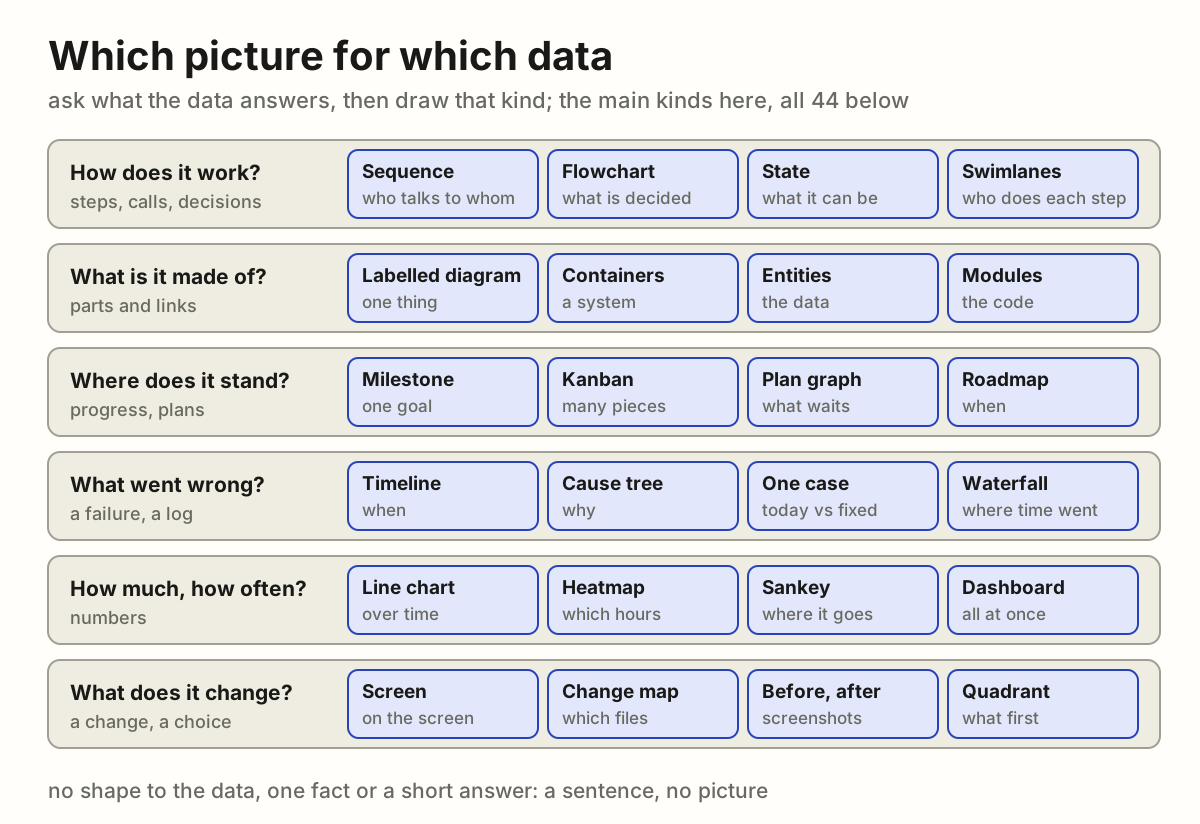
A reply that carries data shows it as a picture. The author takes in a shape
at a glance, where the same data as a paragraph takes a minute and still
hides how its parts connect. The agent asks what the data answers, picks the
kind of diagram for it, and draws that.
It is one case of [Every point of view](https://github.com/vbarbarosh/rules/blob/main/agents/every_point_of_view.md): the
author's story is what they see.
## Why
An agent thinks in text, so it answers in text: steps as a numbered list,
states as sentences, a plan as paragraphs, numbers in a row. The author has
to rebuild the shape in their head: which step waits on which, where the
failure was, what is done and what is not. A picture hands them the shape
itself. Text that holds data is the author's work left undone.
## The rule
1. **Find the data in the reply.** Steps, calls, states, parts, links, a
plan, a failure, numbers over time, a change: anything with a shape.
2. **Ask what it answers,** and take the kind the chooser below gives. Two
questions, two pictures; never one picture that answers neither well.
3. **Draw that kind as its page says,** on the
[diagrams page](https://vbarbarosh.github.io/rules/docs/diagrams.html):
its parts, its colours, when it does not fit.
4. **Picture first, words after.** The reply opens with the outcome in a line,
then the picture, then a line of what it shows; lists and logs come last.
5. **Check it before it goes:** every text inside its box, nothing on top of
anything else, every arrow attached, words as big as the text around it,
the colours of the page it is shown on. A picture that was not looked at
was not checked.
6. **No shape, no picture.** One fact, a yes or no, a name, a single number:
a sentence.
## Which picture for which data
- **How does it work?** Steps, calls and decisions:
[sequence](https://vbarbarosh.github.io/rules/docs/diagrams.html#sequence)
(who talks to whom, in order),
[flowchart](https://vbarbarosh.github.io/rules/docs/diagrams.html#flowchart)
(what is decided where),
[state](https://vbarbarosh.github.io/rules/docs/diagrams.html#state)
(what it can be, what moves it),
[flywheel](https://vbarbarosh.github.io/rules/docs/diagrams.html#flywheel)
(what feeds itself, where it is slow),
[swimlanes](https://vbarbarosh.github.io/rules/docs/diagrams.html#swimlanes)
(who does each step),
[step tree](https://vbarbarosh.github.io/rules/docs/diagrams.html#steptree)
(stages and their small steps, who does each, what it costs),
[pipeline](https://vbarbarosh.github.io/rules/docs/diagrams.html#pipeline)
(files in, steps, files out),
[call graph](https://vbarbarosh.github.io/rules/docs/diagrams.html#callgraph)
(which function calls which).
- **What is it made of, and where does it run?** Parts and links:
[labelled diagram](https://vbarbarosh.github.io/rules/docs/glossaries.html#MAP-13)
(one thing and its parts),
[containers](https://vbarbarosh.github.io/rules/docs/diagrams.html#containers)
(the parts of a system),
[cloud](https://vbarbarosh.github.io/rules/docs/diagrams.html#cloud),
[tiers](https://vbarbarosh.github.io/rules/docs/diagrams.html#tiers),
[network](https://vbarbarosh.github.io/rules/docs/diagrams.html#network),
[isometric](https://vbarbarosh.github.io/rules/docs/diagrams.html#isometric)
(where each part runs),
[entities](https://vbarbarosh.github.io/rules/docs/diagrams.html#entities)
(the data and its links),
[class](https://vbarbarosh.github.io/rules/docs/diagrams.html#class)
(the types of a program and their links),
[breakdown](https://vbarbarosh.github.io/rules/docs/diagrams.html#breakdown)
(a whole split into its parts),
[modules](https://vbarbarosh.github.io/rules/docs/diagrams.html#modules)
and [matrix](https://vbarbarosh.github.io/rules/docs/diagrams.html#matrix)
(which file or part needs which),
[data flow](https://vbarbarosh.github.io/rules/docs/diagrams.html#dataflow)
(where data crosses a trust boundary).
- **Where does it stand?** Progress and plans:
[milestone](https://vbarbarosh.github.io/rules/docs/diagrams.html#milestone)
(one goal),
[kanban](https://vbarbarosh.github.io/rules/docs/diagrams.html#kanban)
(many pieces of work),
[plan graph](https://vbarbarosh.github.io/rules/docs/diagrams.html#plangraph)
(what waits on what),
[roadmap](https://vbarbarosh.github.io/rules/docs/diagrams.html#roadmap)
(what is planned when),
[dashboard](https://vbarbarosh.github.io/rules/docs/diagrams.html#dashboard)
(many parts at once),
[versions](https://vbarbarosh.github.io/rules/docs/diagrams.html#versions)
(which version runs where).
- **What went wrong, and why?** A failure, a log:
[timeline](https://vbarbarosh.github.io/rules/docs/diagrams.html#timeline)
(what happened when),
[chronology](https://vbarbarosh.github.io/rules/docs/diagrams.html#chronology)
(what one user did, in order),
[cause tree](https://vbarbarosh.github.io/rules/docs/diagrams.html#causetree)
(why),
[one case](https://vbarbarosh.github.io/rules/docs/diagrams.html#case)
(one request, today beside fixed),
[questions](https://vbarbarosh.github.io/rules/docs/diagrams.html#questions)
(what is known and what is not),
[waterfall](https://vbarbarosh.github.io/rules/docs/diagrams.html#waterfall)
(where one request spends its time).
- **How much, how often?** Numbers:
[line chart](https://vbarbarosh.github.io/rules/docs/diagrams.html#linechart)
(over time),
[bar chart](https://vbarbarosh.github.io/rules/docs/diagrams.html#barchart)
(how much of each),
[pie chart](https://vbarbarosh.github.io/rules/docs/diagrams.html#piechart)
(shares of one whole),
[heatmap](https://vbarbarosh.github.io/rules/docs/diagrams.html#heatmap)
(which days and hours),
[event plot](https://vbarbarosh.github.io/rules/docs/diagrams.html#eventplot)
(every event of many actors, at its time),
[sankey](https://vbarbarosh.github.io/rules/docs/diagrams.html#sankey)
(where it goes, how much),
[service map](https://vbarbarosh.github.io/rules/docs/diagrams.html#servicemap)
(what talks to what, live),
[flame](https://vbarbarosh.github.io/rules/docs/diagrams.html#flame) and
[treemap](https://vbarbarosh.github.io/rules/docs/diagrams.html#treemap)
(where the time or the size goes).
- **What does it change, and what first?**
[screen](https://vbarbarosh.github.io/rules/docs/diagrams.html#screen)
(where on the screen), screenshots before and after (what the author
sees),
[change map](https://vbarbarosh.github.io/rules/docs/diagrams.html#changemap)
(which files),
[before and after](https://vbarbarosh.github.io/rules/docs/diagrams.html#delta)
(which parts of a system),
[quadrant](https://vbarbarosh.github.io/rules/docs/diagrams.html#quadrant)
(what to do first).
06Fixing: reproduce it, then fix the cause
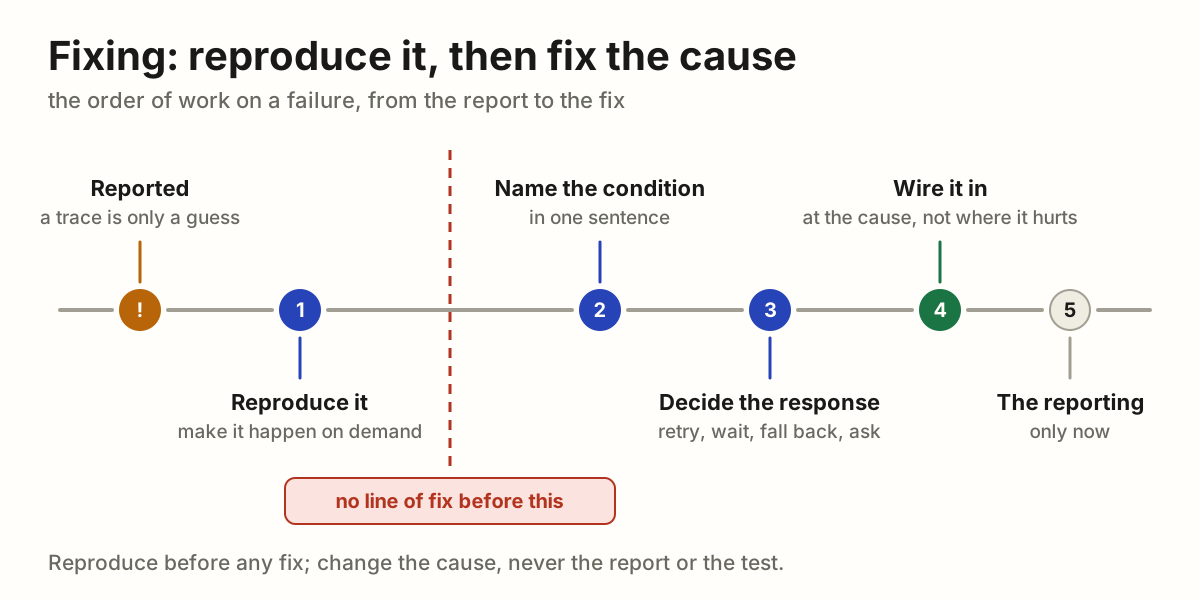
Fixing a bug means the system handles one more case. Before a line of fix is written, the failure is made to happen on demand; then the change goes to what caused it, not to the place where it showed. Muting the report, or loosening the test, fixes nothing.
This page is meant to be handed to an agent as it is: "work like this".
Why
Reading a trace, a diff or the surrounding code produces a hypothesis; only a reproduction turns it into a fact. A fix built on a hypothesis is a guess that ships. The reproduction earns its cost several times over:
- It disproves wrong theories cheaply, before they become code that has to be reverted.
- It tells when the work is done: the reproduction stops reproducing.
- It becomes the regression test, so the condition cannot come back unnoticed.
- It shows the surrounding facts otherwise assumed. The state at the moment of failure is routinely the opposite of what the code suggests.
The rule
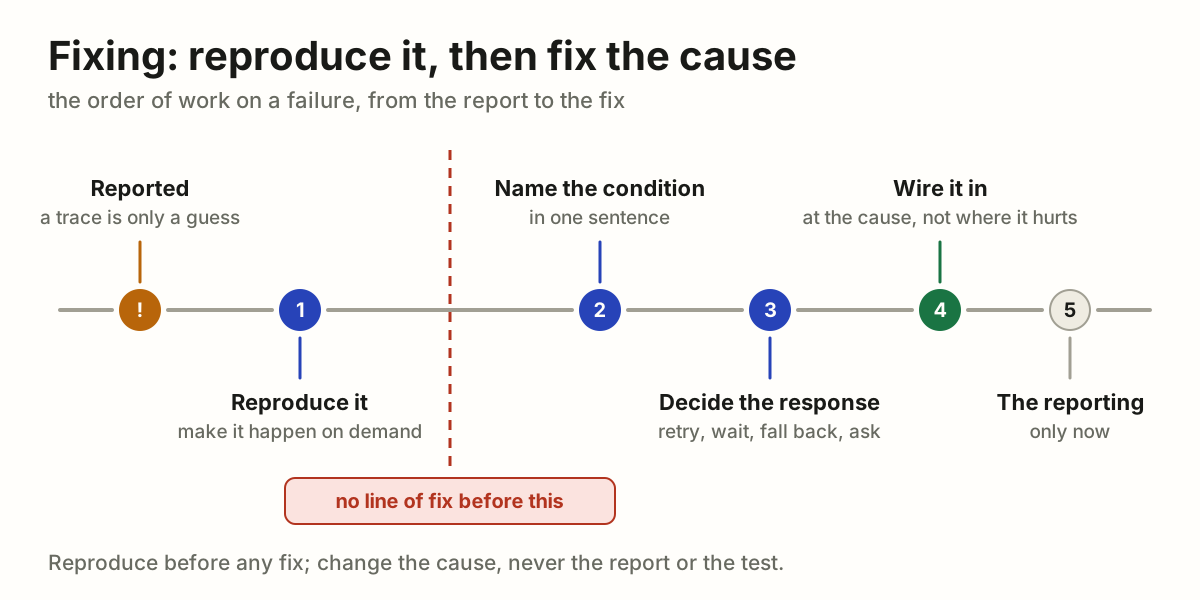
- Reproduce it. Find the conditions under which the error occurs and trigger it deliberately. The breadcrumbs, the release and the affected users form the hypothesis; the reproduction confirms it. Trace the event's group uid through the logs first (LOG-05): it shows the whole sequence around the failure.
- Name the condition. State in one sentence what has to be true in the world for this to happen. If it cannot be stated, it is not understood yet.
- Decide the response. What should the app do when that condition holds: retry, wait, re-authenticate, fall back, ask the user? "Nothing" is an answer only for conditions outside the app's control, and it still needs an outcome the user sees.
- Wire the response into the app, at the cause. The condition is now handled: the code has an answer for it.
- Only then consider the reporting. Once the condition is handled, the report for that exact case has served its purpose.
No line of fix is written before the first step is done, however obvious the cause looks from the stack trace. A condition that cannot be reproduced locally is no permission to skip ahead: add instrumentation that captures the discriminating facts, ship it, and wait for real data. Observation is a slower reproduction, not a substitute for one.
Fix the cause, not where it hurts
What fails shows where it hurts, not what broke. A red test, an error on the screen, a step that hangs: that is where the pain shows. Trace it back to what made it so, and change that.
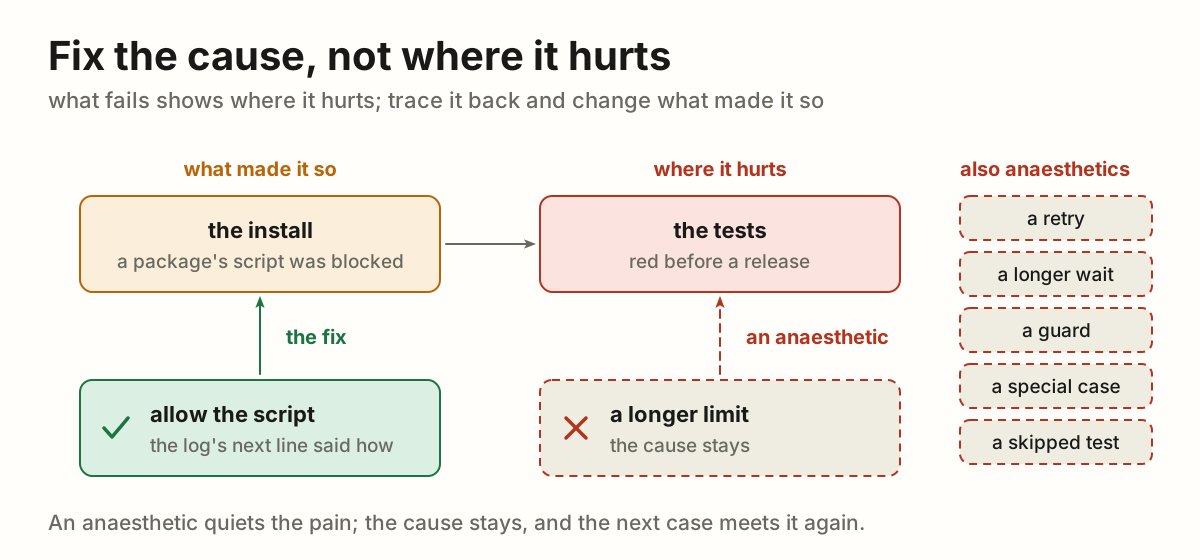
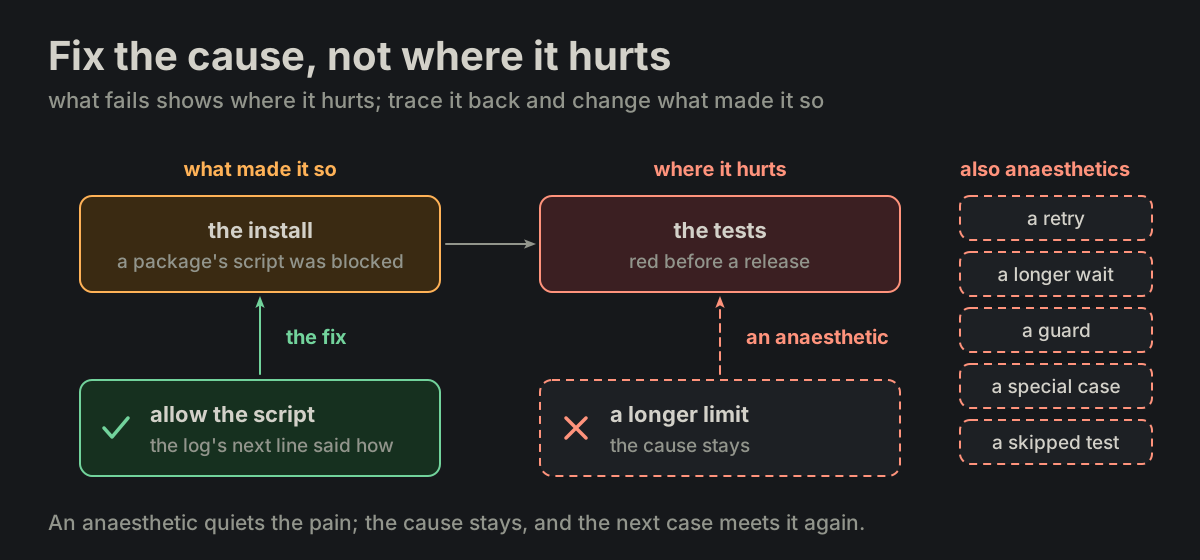
- A change only where it shows (a longer limit, a retry, a longer wait, a guard, a special case, a test loosened or skipped) is an anaesthetic: the pain goes quiet, the cause stays, and the next case meets it again.
- Read the whole log before the first change, the line after the error too. The cause, and often the remedy, is written right beside the pain.
- A cause out of reach (another repository, someone else's machine) is named, where it is and what it does, and goes to whoever can fix it. A stopgap where it hurts only when asked for, and called a stopgap.
For example: before a release the tests went red. The install log held the cause and the remedy side by side: a package's install script was blocked, and the next line named the command that allows it. The limit of a test was stretched instead: four lines, already understood, a release waiting. It cost a question, a commit of junk and a commit to undo it. The right order was the other one: make the install right first, and stretch a test only if that cannot be done.
Muting is not fixing
- Dropping a report, lowering its level, filtering it in
beforeSend, resolving or archiving the issue, or collapsing it into a single group fixes nothing. For the muted condition it is the same as not monitoring at all. - Reducing report volume is a separate task, valid only after the condition is reproduced and handled, and only for the exact cases the handling covers.
- A report that still arrives after the fix is information, not a failure of the fix: the condition occurred for a reason the handling does not cover yet.
- The same applies to guards added on a hunch. A
catch that swallows a class of errors because they "look transient" is a mute with better manners.
A fix is one more case the system handles
Fixing is not making the test mute; it is making the system handle one more case. The measure of a fix is the set of inputs the system answers correctly. A fix grows that set. Anything that leaves the set unchanged is not a fix, whatever it does to the red.
The same move wears two costumes, and both are mutes:
- Muting the report: dropping the event, lowering its level, filtering it, resolving the issue.
- Muting the test: loosening the assertion, accepting the wrong value as expected, marking it skipped, deleting it.
A test that goes green because the expectation moved to meet the code has reported nothing. The condition still occurs, and now nothing watches it.
Green comes from the other direction: the code learns the case, and the untouched assertion stops failing. So write the assertion as the outcome the user should get, watch it fail for the real reason, then teach the system the case. If the assertion has to change to pass, the change is the finding: say what new behaviour it now describes, and why that is the right one.
For example: a batch update returned 500 when an item carried a label. The client updates an item by posting its listing row back with one field changed, so the labels came back as objects where the handler expected titles. The test asserted 200 and the labels intact, and stayed exactly as written; the handler learned to read a title out of either shape. One more case handled, one assertion never touched.
Reproduce before naming a defect
The rule is usually read as a rule about writing code. It is also a rule about writing sentences. Naming something a defect sends a person to look for it, and that person pays for the claim in hours while the reproduction would have cost minutes.
Reproduce before you name it. A screen that looks wrong, a value that looks odd, a list that reads strangely: none of that is a defect until the thing happens on demand.
What cannot be reproduced is still worth reporting, under its own name. Call it an unreproduced observation, in those words, and give three things: what was seen, what was tried, and what is missing. A reader then knows at once whether an item costs them an investigation or is merely something noticed.
For example: four items in a library carried the name of a placeholder file, and a check report called it a naming defect. One upload showed that every path already named its item correctly; the four records had come from outside the product. Thirty seconds of checking would have prevented the claim; without it, it would have become someone's afternoon.
What an unhandled error means
- An unhandled error means we are not prepared for this condition: we do not yet know what the app should do about it. It is an open question, not a defect in the reporting.
- A stack trace is a hypothesis about the cause, not the cause. An explanation derived only from reading a trace, a diff or the surrounding code is unverified until it is reproduced.
- Event volume measures how often we are unprepared, not how broken the code is. A high event count is no reason to silence the group.
What the user sees
- The user must never see a raw error for a condition the app can recover from: no error modal, no stack trace, no library wording such as
Network Error. - The worst acceptable outcome is a visible recovery state: a preloader, a "reconnecting" indicator, a disabled control, something that says the app is working on it and the user's data is safe.
- Show a real error only when recovery is impossible and the user has to make a decision. Then say what happened in their terms and what they can do.
Before calling it fixed
- Can the triggering condition be stated in one sentence?
- Was it reproduced, and does the reproduction stop reproducing after the change?
- What does the user see while the app recovers?
- If this error class occurs again for a different reason, does it still reach us?
- Is the change where the cause is, or only where it showed?
Before calling it a defect
- Did it happen on demand, or was it only seen once?
- Was one thing changed at a time between the working case and the broken one?
- Was the code path that produces it read, or only the screen that shows it?
- If none of those hold, is it written as an unreproduced observation?
# Fixing: reproduce it, then fix the cause
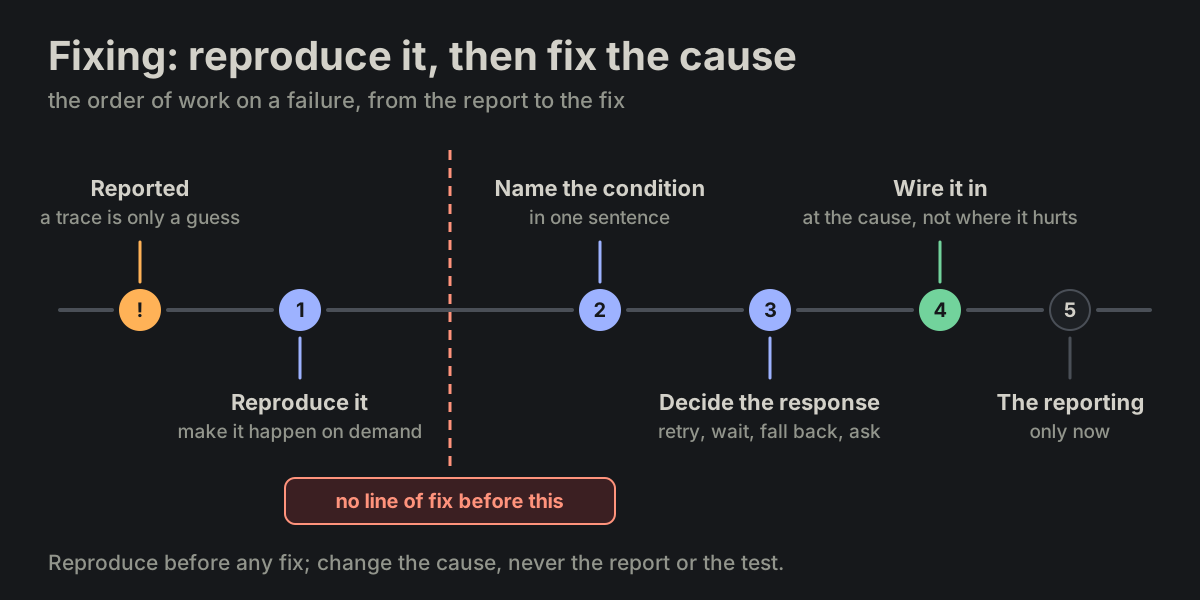
Fixing a bug means the system handles one more case. Before a line of fix is
written, the failure is made to happen on demand; then the change goes to
what caused it, not to the place where it showed. Muting the report, or
loosening the test, fixes nothing.
This page is meant to be handed to an agent as it is: "work like this".
## Why
Reading a trace, a diff or the surrounding code produces a hypothesis; only a
reproduction turns it into a fact. A fix built on a hypothesis is a guess
that ships. The reproduction earns its cost several times over:
- It **disproves wrong theories cheaply**, before they become code that has
to be reverted.
- It tells **when the work is done**: the reproduction stops reproducing.
- It becomes the **regression test**, so the condition cannot come back
unnoticed.
- It shows the **surrounding facts** otherwise assumed. The state at the
moment of failure is routinely the opposite of what the code suggests.
## The rule
1. **Reproduce it.** Find the conditions under which the error occurs and
trigger it deliberately. The breadcrumbs, the release and the affected
users form the hypothesis; the reproduction confirms it. Trace the
event's group uid through the logs first
([LOG-05](https://vbarbarosh.github.io/rules/docs/rules.html#LOG-05)): it
shows the whole sequence around the failure.
2. **Name the condition.** State in one sentence what has to be true in the
world for this to happen. If it cannot be stated, it is not understood
yet.
3. **Decide the response.** What should the app do when that condition
holds: retry, wait, re-authenticate, fall back, ask the user? "Nothing"
is an answer only for conditions outside the app's control, and it still
needs an outcome the user sees.
4. **Wire the response into the app,** at the cause. The condition is now
handled: the code has an answer for it.
5. **Only then consider the reporting.** Once the condition is handled, the
report for that exact case has served its purpose.
No line of fix is written before the first step is done, however obvious the
cause looks from the stack trace. A condition that cannot be reproduced
locally is no permission to skip ahead: add instrumentation that captures
the discriminating facts, ship it, and wait for real data. Observation is a
slower reproduction, not a substitute for one.
## Fix the cause, not where it hurts
**What fails shows where it hurts, not what broke.** A red test, an error on
the screen, a step that hangs: that is where the pain shows. Trace it back to
what made it so, and change that.
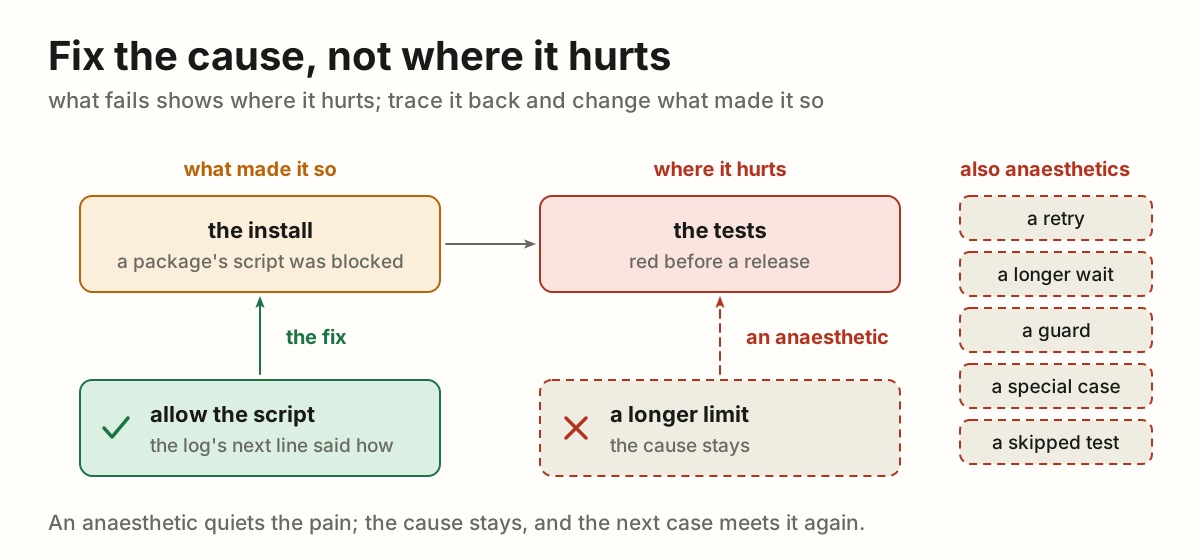
- A change only where it shows (a longer limit, a retry, a longer wait, a
guard, a special case, a test loosened or skipped) is an **anaesthetic**:
the pain goes quiet, the cause stays, and the next case meets it again.
- **Read the whole log before the first change,** the line after the error
too. The cause, and often the remedy, is written right beside the pain.
- A cause **out of reach** (another repository, someone else's machine) is
named, where it is and what it does, and goes to whoever can fix it. A
stopgap where it hurts only when asked for, and called a stopgap.
For example: before a release the tests went red. The install log held the
cause and the remedy side by side: a package's install script was blocked,
and the next line named the command that allows it. The limit of a test was
stretched instead: four lines, already understood, a release waiting. It
cost a question, a commit of junk and a commit to undo it. The right order
was the other one: make the install right first, and stretch a test only if
that cannot be done.
## Muting is not fixing
- Dropping a report, lowering its level, filtering it in `beforeSend`,
resolving or archiving the issue, or collapsing it into a single group
**fixes nothing**. For the muted condition it is the same as not
monitoring at all.
- Reducing report volume is a **separate task**, valid only after the
condition is reproduced and handled, and only for the exact cases the
handling covers.
- A report that still arrives after the fix is **information**, not a
failure of the fix: the condition occurred for a reason the handling does
not cover yet.
- The same applies to guards added on a hunch. A `catch` that swallows a
class of errors because they "look transient" is a mute with better
manners.
## A fix is one more case the system handles
**Fixing is not making the test mute; it is making the system handle one
more case.** The measure of a fix is the set of inputs the system answers
correctly. A fix grows that set. Anything that leaves the set unchanged is
not a fix, whatever it does to the red.
The same move wears two costumes, and both are mutes:
- **Muting the report:** dropping the event, lowering its level, filtering
it, resolving the issue.
- **Muting the test:** loosening the assertion, accepting the wrong value as
expected, marking it skipped, deleting it.
A test that goes green because the expectation moved to meet the code has
reported nothing. The condition still occurs, and now nothing watches it.
Green comes from the other direction: the code learns the case, and the
untouched assertion stops failing. So write the assertion as the outcome the
user should get, watch it fail for the real reason, then teach the system
the case. If the assertion has to change to pass, the change is the finding:
say what new behaviour it now describes, and why that is the right one.
For example: a batch update returned 500 when an item carried a label. The
client updates an item by posting its listing row back with one field
changed, so the labels came back as objects where the handler expected
titles. The test asserted 200 and the labels intact, and stayed exactly as
written; the handler learned to read a title out of either shape. One more
case handled, one assertion never touched.
## Reproduce before naming a defect
The rule is usually read as a rule about writing code. It is also a rule
about writing sentences. Naming something a defect sends a person to look
for it, and that person pays for the claim in hours while the reproduction
would have cost minutes.
**Reproduce before you name it.** A screen that looks wrong, a value that
looks odd, a list that reads strangely: none of that is a defect until the
thing happens on demand.
**What cannot be reproduced is still worth reporting, under its own name.**
Call it an **unreproduced observation**, in those words, and give three
things: what was seen, what was tried, and what is missing. A reader then
knows at once whether an item costs them an investigation or is merely
something noticed.
For example: four items in a library carried the name of a placeholder file,
and a check report called it a naming defect. One upload showed that every
path already named its item correctly; the four records had come from
outside the product. Thirty seconds of checking would have prevented the
claim; without it, it would have become someone's afternoon.
## What an unhandled error means
- An unhandled error means **we are not prepared for this condition**: we do
not yet know what the app should do about it. It is an open question, not
a defect in the reporting.
- A stack trace is a **hypothesis about the cause, not the cause**. An
explanation derived only from reading a trace, a diff or the surrounding
code is unverified until it is reproduced.
- Event volume measures **how often we are unprepared**, not how broken the
code is. A high event count is no reason to silence the group.
## What the user sees
- The user must **never see a raw error** for a condition the app can
recover from: no error modal, no stack trace, no library wording such as
`Network Error`.
- The worst acceptable outcome is a **visible recovery state**: a preloader,
a "reconnecting" indicator, a disabled control, something that says the
app is working on it and the user's data is safe.
- Show a real error only when **recovery is impossible** and the user has to
make a decision. Then say what happened in their terms and what they can
do.
## Before calling it fixed
- Can the triggering condition be stated in one sentence?
- Was it reproduced, and does the reproduction stop reproducing after the
change?
- What does the user see while the app recovers?
- If this error class occurs again for a different reason, does it still
reach us?
- Is the change where the cause is, or only where it showed?
## Before calling it a defect
- Did it happen on demand, or was it only seen once?
- Was one thing changed at a time between the working case and the broken
one?
- Was the code path that produces it read, or only the screen that shows it?
- If none of those hold, is it written as an unreproduced observation?
No guide matches that.